11 min read
GUIDE / Event Production
How to Brief Recording and Live Streaming Requirements
Brief event recording and live streaming by identifying each destination and what its audience needs to see and hear. Agree the programme to include or exclude, picture and audio requirements, viewer access, captions, recording deliverables, timings, responsibilities and required permissions. Then agree how each output will be checked and who can accept it. A successful room presentation does not establish that the recording or stream contains the intended programme.
On this page
The room, the recording and the stream may need different versions of the same event.
Start with the outputs, not “video included”
“We need the event filmed” leaves important questions unanswered. Is the requirement a live stream, a complete recording, individual session files, a highlight film or material for someone else to edit?
Those requests describe different outcomes. Confirm which are included before comparing equipment or prices.
Brief each destination, not just the equipment producing it.
A destination is a place where particular pictures or sound must arrive: a room screen, an online player, a recording or a presenter display. The same source material can be required in different combinations at those destinations. The production team must confirm whether the proposed system and scope can deliver them.
The wider production brief explains the event. This guide develops the recording and streaming part of that brief.
Separate four different requests
Room presentation is what the people in the venue see and hear. It may include stage activity, screens and the audience sound system.
Recording captures agreed material for later use. Confirm whether the requested result is a finished programme, separate session files, edited material or separate source recordings. One request does not automatically include the others.
Live streaming delivers an agreed programme to viewers while the event is happening. Identify the viewing destination, access arrangement and operating responsibility, rather than assuming a camera recording includes a stream.
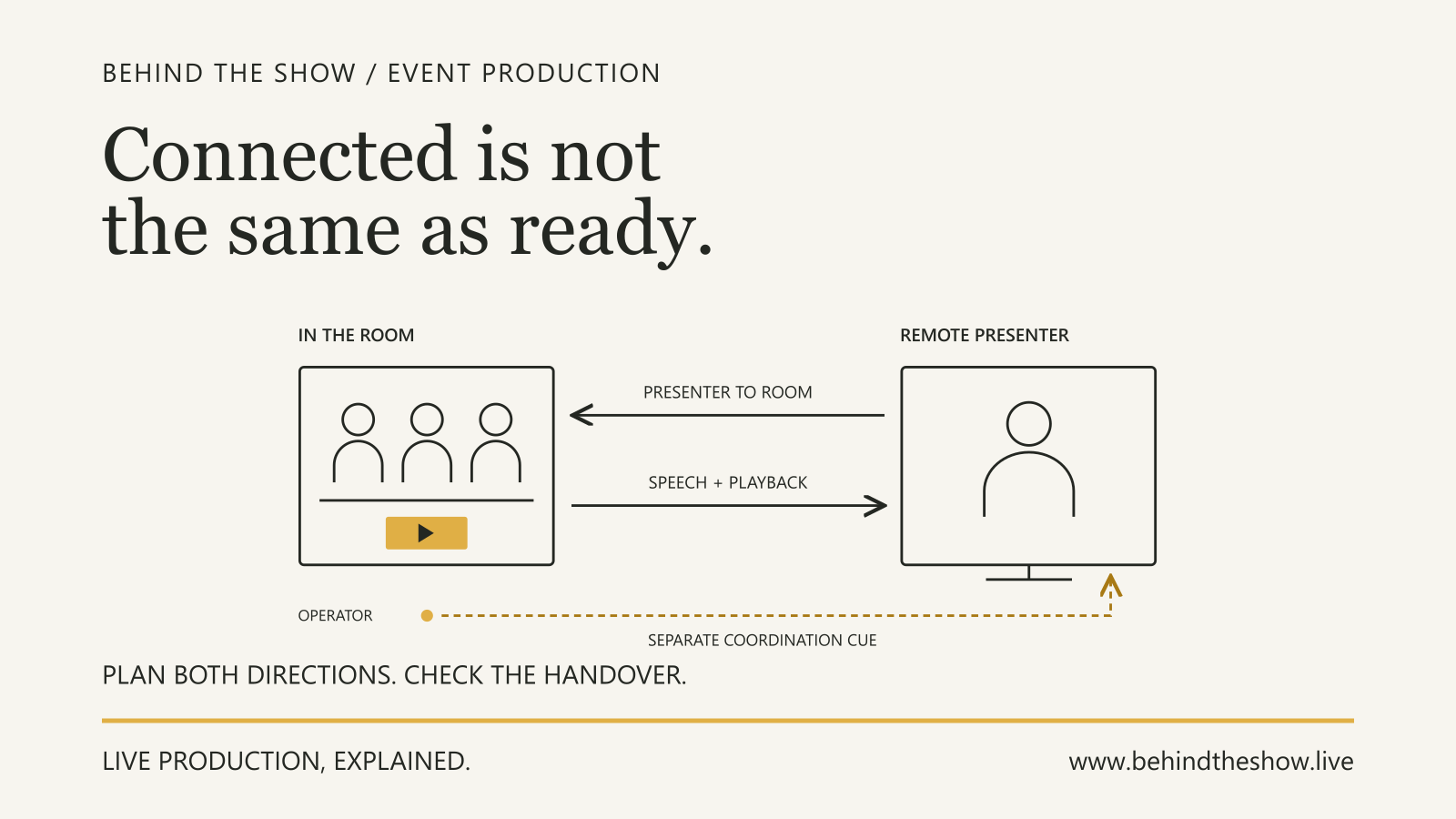
Remote participation allows someone elsewhere to contribute to the event. An online viewer is not necessarily a remote participant. A remote panellist may need a return picture and sound, a private preparation arrangement and a moderated handover that ordinary viewers do not receive. Use the Remote Presenter Participation guide for those requirements.
These services can coexist. Their overlap must be agreed, not inferred from the word “hybrid”.
Describe the picture at each destination
State what each audience needs to follow. A person in the room might see the speaker directly while the screen shows slides. An online viewer might need a camera picture and the slides in an agreed composition. A recording might need only the selected session, not the holding material used before the stream begins.
Identify presentations, films, camera views, names and titles, branding, holding graphics and captions where required. Explain what should happen between segments and during breaks. Ask whether text remains readable in the intended viewing arrangement; the presence of a slide in an output does not establish its usefulness.
If someone requests a “clean feed”, clarify exactly what should be absent, such as titles or graphics. Do not accept the label as a complete specification.
Keep private presenter notes and backstage material out of the intended audience outputs. Identify their separate destinations if needed. The content handover guide covers file versions, destination requirements and delivery checks in more detail.
Brief the audio as deliberately as the picture
For each destination, list the sound it needs: presenters, moderator, audience questions, remote contributors, presentation playback and any agreed room atmosphere. Identify what must not be included, such as private production communications or material excluded from that destination.
Do not specify the recording sound simply as “whatever the room hears”. Shure's house-of-worship audio guide describes situations where sources heard directly in a room need additional capture for listeners elsewhere, and illustrates separate room and streaming mixes. That example explains a possible difference between audiences; it does not require every event to use a separate mixer or the same system design. [S1]
Ask the audio and recording or streaming leads to agree the required sources and receiving checks. They determine the suitable capture, mixing and routing. This guide does not prescribe console settings, loudness targets or connections.
A correct picture does not confirm the accompanying sound.
Agree the recording handover
Describe the intended use and the actual deliverables. For example: one finished panel-discussion file, separate presentation recordings, an edited highlights film, or source material for a nominated editor.
Confirm:
- which sessions, starts, ends and exclusions define each deliverable; - whether editing, captions, titles or corrections are included; - the recipient's required format and delivery method, agreed with the technical team; - naming, version, delivery deadline and who checks and accepts the result; - whether source files, separate recordings or project files are included; - who retains material, for how long, and who handles later retrieval or deletion requests under the agreed arrangement.
Do not promise unrestricted footage retention or assume all camera and audio sources are separately recorded. Ask for those requirements explicitly and confirm their feasibility and scope.
Define the live-viewing arrangement
Identify where viewers will watch, who administers that destination and whether access is public or restricted under the agreed arrangement. State any expected audience scale, locations, languages and support needs that are known. Let the responsible specialists assess platform capacity and connectivity rather than choosing a universal bandwidth figure.
Confirm who provides account access, operates the stream, monitors the viewer experience and responds to problems. Keep credentials and stream keys out of a generally circulated brief; agree a controlled handover with the authorised operator.
Specify whether captions, moderation, audience questions or a replay are required. Do not assume captions supplied during a stream will also appear in the delivered recording, or that a live event automatically includes an approved replay.
Where a viewer can submit questions, establish who receives and selects them and how they reach the moderator. That is a programme arrangement as well as a platform feature.
Separate permission, content approval and technical checks
Ask the organiser to identify the permissions and restrictions relevant to each intended use, including speakers, performances, films, music, audience participation and later reuse where applicable. Unresolved permission questions belong with the organiser and appropriate rights or legal advisers, not with an operator guessing at show time.
Approval to display material in the room must not be treated as confirmation that recording, streaming or later publication has also been approved. Record the authorised inclusion or exclusion for each destination. This guide does not determine what legal permissions are required or whether they are sufficient.
Also distinguish approval of the message, acceptance of the technical output and authority to publish. A technically successful recording is not automatically approved for release.
Worked example: one panel, three different outputs
A conference has a short opening film followed by a moderator, two panellists and audience questions. Everyone contributing to the panel is in the venue. The organiser requests room presentation, a live stream and a panel recording for internal review. Remote contributors, public replay, highlight editing and separate camera recordings are outside the agreed brief.
For this example, the organiser confirms that the opening film is included for room presentation only. It is excluded from both the stream and the recording. This is a stated decision in the scenario, not an assessment of the film's legal clearance.
| Destination | Intended picture | Intended audio | Programme boundary |
|---|---|---|---|
| Room | Opening film, then panel slides where used; the audience sees the stage directly | Film sound, moderator, panellists and audience questions through the agreed room system | Full room programme |
| Live stream | Approved holding graphic during the film; camera and slides for the panel | Agreed holding music during the film period; moderator, panellists and audience questions during the panel | Stream operator follows separately agreed start, transition and end instructions |
| Internal-review recording | Selected camera-and-slide programme for the panel | Moderator, panellists and audience questions | Panel only, from the agreed introduction to the agreed close; no opening film or pre-show holding material |
The holding music is included in the organiser's destination-specific approval record. Its selection and permissions are not left to the operator. The recording deliverable is one panel file in the agreed recipient format, due the next working day. Release outside the internal-review audience requires a separate decision.
What the checks reveal
During the planned technical rehearsal, the room receives the film correctly. A nominated checker at the agreed stream-viewing position sees the holding graphic but hears the film soundtrack instead of the intended holding music.
The picture check has passed for that segment. The audio check has not. The team does not mark the stream ready merely because it has a moving picture or because the room sounds correct.
The production coordinator records the discrepancy and its owner. The responsible audio and video leads review and correct the affected arrangement within their agreed technical responsibilities. The organiser does not diagnose a console setting, and the stream operator does not substitute unapproved content to conceal the problem.
The team repeats the affected destination checks with the agreed film, holding material, panel speech and an audience question. It checks the transition as well as the steady state. The recording operator also captures a representative test and the nominated reviewer plays that file back to check the panel picture, speech, audience question and agreed boundaries.
What allows the team to proceed
In this example, the organiser's nominated content approver confirms the intended inclusions and exclusions. The technical leads report the scoped results they checked. The nominated production decision-maker accepts those reported results against the agreed plan before authorising the stream start; the operator executes that instruction.
These are assigned responsibilities for this example, not universal job-title authorities. An unresolved exclusion or failed destination check remains visible for a decision. It is not converted into an assumed pass.
On show day, the recording operator follows the agreed start and stop arrangement. The delivered panel file still requires its own handover check. Successful rehearsal does not establish that the final file was captured and delivered correctly.
The lesson is not that three outputs always require three independent systems. It is that their different commitments must be designed, checked and accepted deliberately.
ILLUSTRATIVE SCENARIO
Check where the result is actually received
Agree what the test will demonstrate, who will observe each destination and what limitations remain. An equipment preview, an actual viewer page and a played-back recording answer different questions.
For a concrete platform-specific example, Vimeo's external-encoder preview guidance says its automatic captions must be checked on the video page or embedded player rather than the preview player. The wider BTS lesson is to identify the right check position for the feature being accepted, not to assume every platform behaves like Vimeo. [S2]
Use representative approved content and transitions. Check picture and sound together, relevant audience-question paths, agreed exclusions, captions where requested, and the recording by playback. Confirm the viewer-access arrangement with an appropriate authorised test account or viewer. A single successful access test is not a security certification.
Arrange testing with the relevant teams so it does not unexpectedly interrupt the public programme, overwrite required material or publish a private rehearsal. A successful short test does not prove uninterrupted service for the whole event.
Put decisions and ownership in the working plan
Keep a current output brief alongside the run of show. Record the version, destination requirements, start and stop instructions, approval owner, technical owner, receiving checker, delivery recipient and open actions. One person may hold several responsibilities; do not assume that they do.
Mark information as Known, To be confirmed, Not applicable or Responsibility not yet assigned. An unknown platform, pending content permission or unassigned stream monitor is an action to resolve, not a blank for someone else to interpret.
If the plan changes, identify the affected destinations and the checks that need repeating. Agree who can hold, omit or substitute a segment and who can authorise restarting or ending a stream. The Backup and Recovery guide develops that decision process without treating spare equipment as a complete recovery plan.
Finish with an output brief the organiser and delivery team can both understand: what each audience receives, what is excluded, what must be checked and who accepts the result.
Related questions
What should a recording and live-streaming brief include?
Identify each destination, intended audience, programme inclusions and exclusions, pictures, audio, access, captions, recording deliverables, timings, permissions, responsibilities and acceptance checks.
Is an event recording the same as a live stream?
No. Recording captures agreed material for later use; live streaming delivers an agreed programme to viewers while the event happens. They can share parts of a system but require separately agreed outputs and responsibilities.
Should room screens and a live stream show the same content?
Not necessarily. People in the venue may see the stage directly while online viewers need camera pictures, slides or other agreed material. Specify what each destination includes and excludes.
What audio should an event recording or live stream receive?
Specify the required sources, such as presenters, audience questions and approved playback, together with any exclusions. The responsible technical team determines and checks how those sources reach each destination.
Why can audio reach the PA but not the recording?
The destinations may use different routing or outputs. The recording path needs its own checks even when the audience feed works.
What recording deliverables should be agreed before an event?
Agree the required sessions or edits, included pictures and sound, format, captions or titles, delivery recipient and deadline, acceptance responsibility, and whether source recordings or project files are included.
What should be checked before an event stream goes live?
Check the agreed viewer output with representative approved pictures, sound, transitions and exclusions, plus access and captions where requested. Record results and limitations; one preview does not establish every feature or continuous service.
Who approves what can be recorded or streamed at an event?
Assign the organiser's content and publication approval responsibility, obtain appropriate permissions or specialist advice, and record destination-specific decisions. Technical acceptance and authority to start the stream are separate responsibilities that must also be assigned.
Sources & references
- House of Worship Audio SystemsShure / primary document
- How to preview your stream before going liveVimeo / primary document
Continue learning