9 min read
GUIDE / Event Production
How Production Decisions Shape the Audience Experience
Production decisions shape the audience experience by affecting how people hear, see, follow and participate in an event. Sound, visual content, stage arrangement, transitions and participation routes need to support the actual programme. A useful plan connects each audience requirement to an agreed responsibility and an event-specific check. Working equipment alone does not establish that the intended experience works, and production cannot guarantee audience engagement.
On this page
Follow one panel discussion from audience requirements to checked production decisions.
Start with what the audience needs to do
A microphone can pass audio, a screen can display an image and a remote connection can remain online while part of a discussion is still impossible to follow.
Production decisions influence the conditions in which an audience experiences the programme. Can people follow the conversation? Can they identify who is speaking? Can they see the material being discussed? If questions are invited, how does somebody ask one and hear the answer?
These are useful requirements before they become equipment choices. The answer depends on the programme, venue, participants and agreed scope, rather than audience numbers alone.
Describe what people need to hear, see and do before deciding what equipment is required.
The live event production explainer establishes how the production fits together. Here, the task is more specific: follow a requirement through a decision and check whether that decision supports the intended exchange.
One panel, several connected requirements
Consider a conference panel with a moderator and two panellists onstage, a third panellist joining remotely, and a seated audience invited to ask questions. A presentation precedes the panel. Recording and public streaming have not been requested and are not assumed to be included.
The intended experience is straightforward: people in the room should be able to follow the discussion, identify the contributors, see relevant material and take part in the agreed question-and-answer format. The remote panellist must also be able to follow the questions they are expected to answer.
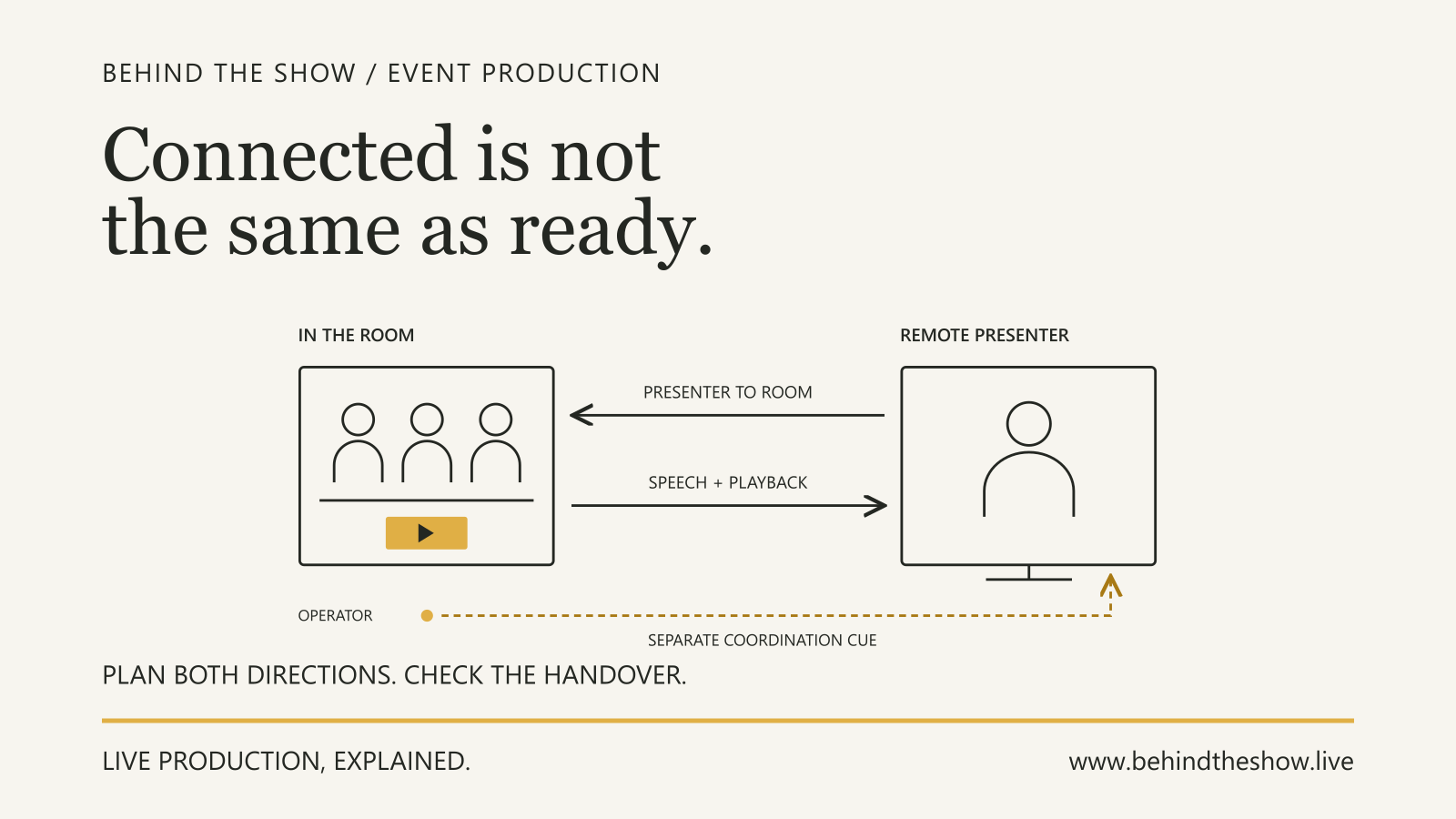
That last requirement changes the production conversation. A question being audible in the room does not establish that it reaches the remote panellist.
Turn the intended exchange into decisions
The following record is a planning example, not a system specification. Role names describe functions in this fictional arrangement; staffing and authority vary by production.
| Requirement | Production decision to agree | Responsible functions | What to check |
|---|---|---|---|
| People in the room can follow speech | Ask the audio team to plan for the actual speaking and audience arrangement, including questions | Production coordinator, audio team and venue for relevant constraints | Use representative speech and the intended arrangement at agreed audience positions; record positions not yet checked |
| People can identify the remote contributor and follow relevant material | Agree what appears on screens during discussion, questions and changes of speaker | Producer, content/video team and remote-participation team | Run the intended sequence, including speaker identification and content changes, from relevant viewing positions |
| Audience members have an understood way to ask questions | Agree the participation format, who manages it and what assistance or alternative arrangements are needed | Organiser, audience-facing team and relevant technical/accessibility providers | Rehearse the invitation, question handover and reply, including the agreed access arrangements |
| The remote panellist can hear the question and contribute a reply | Include the audience-question path in the remote-participation requirement | Audio and remote-participation teams, with the receiving participant | Have the actual remote participant confirm they can follow a representative room question, then check the return exchange |
| The presentation can become a panel without losing the thread | Agree the stage, content, participant and cue readiness needed for the transition | Stage team, show caller, content/video and audio teams within their assigned scope | Rehearse the transition and agree who reports readiness, who can hold and who authorizes programme changes |
The record does not prescribe a microphone count, screen size or technical routing. Those decisions belong with the relevant people, using the event's requirements and constraints. It makes the purpose of their work explicit.
The rehearsal exposes a missing destination
During rehearsal, a person in the room asks a question using the agreed audience-question arrangement. The moderator and room audience can hear it. The remote panellist reports that they cannot follow the question.
Record that observation precisely. It identifies an unsuccessful exchange at one destination. It does not, by itself, identify a faulty cable, platform setting or individual at fault.
The coordinator refers the issue to the audio and remote-participation teams. Those teams investigate the relevant arrangement and make an agreed adjustment within their scope. The producer confirms that the question format remains the intended one.
The team then repeats the exchange with the actual remote participant: invitation, audience question, confirmation that the question can be followed, remote reply and return to the moderator. They also check the affected room output rather than assuming a change for the remote contributor cannot affect it.
This is why a soundcheck and a rehearsal have related but different jobs. Technical checks support the programme; rehearsing the exchange tests the people, sequence and handovers as well.
Record the result without claiming too much
The repeated question and reply work in the checked arrangement. The remote panellist confirms they can follow that question, and the agreed room listening positions are checked again.
The final seating layout has not yet been released, so the rear audience positions remain untested. In this example, the coordinator records that limitation. The organiser is responsible for issuing the final layout; the audio and video teams agree to check the affected positions once seating is in place and before the audience is admitted. A conflict with the available checking window must return to the person authorized to decide the event plan.
The result is a checked exchange with a defined remaining action. It is not evidence that every audience position, every future remote connection or the audience's satisfaction has been verified.
ILLUSTRATIVE SCENARIO
Check the experience at the relevant destination
A check is more useful when it identifies what somebody needs to receive or do. “The screen is on” and “the presentation can be followed from the agreed audience positions” are different statements.
The same distinction applies to a panel question. Checking the moderator's microphone alone does not test audience participation. Checking the incoming remote picture alone does not test what the remote participant hears. A successful exchange requires the relevant directions and handovers to be considered. For the planning process, the Remote Presenter Participation guide covers receiving requirements, responsibilities, tests and recovery decisions through a separate worked panel example.
Use the actual programme arrangement where practicable. Record the material, positions, participants and conditions checked, together with relevant limitations. When the layout, content or connection changes, identify which previous checks are affected and who will revisit them.
For visual material, the screen-content handover guide explains how content requirements and checked playback become an understood handover. A file being delivered does not establish that its intended use has been checked.
Make participation and accessibility explicit
Do not assume that an invitation to ask questions gives every participant a usable way to contribute. Ask about access requirements early and agree who will coordinate the relevant arrangements.
W3C's accessible-events guidance recommends asking speakers and participants about accessibility requirements and planning relevant services, materials, venue and remote-platform arrangements. It is planning guidance, not a certificate that a particular event is accessible.
Depending on the event and participants, the discussion may need to include captions, interpreting, assistive listening, accessible materials or a supported participation route. Agree provision with the participants and appropriate providers; do not treat a generic checklist or one person's successful test as proof that every access requirement has been met.
The organiser, venue and suppliers need an explicit division of responsibilities. A production supplier should not be presumed to own every part of the guest journey, just as a venue service should not be presumed included without confirmation. Use the agreed responsibility record.
Transitions are part of the experience
The audience does not experience audio, screens and stage activity as separate departmental checklists. During the move from presentation to panel, several things may need to become ready together: participants, stage positions, sound, remote connection and the correct screen state.
Put the relevant sequence and dependencies into the run of show. Agree how readiness is reported and what happens if one part is not ready. Do not assume the show caller may change the programme or that a fixed transition duration suits every event.
A transition that worked in rehearsal provides useful evidence about that arrangement. It still needs a response if a participant, content item or technical condition changes.
Production supports engagement; it cannot promise it
Production can support the audience's ability to follow and participate. It cannot guarantee that a discussion is compelling, that every person wants to contribute or that the event achieves its wider objectives.
Keep observable results separate from conclusions about audience response. A participant confirming that they heard a question is evidence about that exchange. It is not a measure of the whole audience's engagement.
This distinction helps when reviewing the event afterwards. Record what was checked, what failed, what changed and what feedback was actually received. Avoid turning the absence of complaints into proof that every requirement was met.
Carry the audience requirement into the brief
Describe the intended activity when requesting production support. “Panel with audience questions and a remote panellist” is a starting point. Explain who needs to see and hear whom, how participation should work and which responsibilities are included or still unassigned.
The production-quote briefing guide helps turn that information into a useful supplier conversation. The Event Production Brief Builder can help document the known requirements and unknowns in a structured brief to share with any production company.
Working equipment is a starting point. The useful check is whether the agreed activity works for the people taking part.
Related questions
How do production decisions shape the audience experience?
Production decisions affect how people hear, see, follow and participate in the programme. Connect each requirement to an agreed responsibility and an event-specific check; equipment operating alone does not establish that the intended exchange works.
What should be checked before audience Q&A begins?
Check the agreed question route, relevant access arrangements, who manages the handover and whether the intended recipients can follow the question and reply. Include remote contributors where applicable, and record untested conditions and unresolved responsibilities.
Can production guarantee audience engagement?
No. Production can support the conditions for following and participating in an event, but working systems and successful checks do not guarantee the audience's response or the event's wider outcomes.
What should be included in an event production brief?
Include what is happening, where and when it happens, who is involved, what the audience and performers need, the schedule and access, known venue information, supplier responsibilities and any information still to be confirmed.
Why does the event flow matter when preparing a production quote?
Event flow reveals the presentations, panels, awards, performances, transitions and other activity the production must support. The same audience and venue can require a different solution when the programme changes.
What information is needed for a remote presenter?
Identify the person's role, whether communication is one-way or two-way, whether audio and video are required, what the remote person and venue must each see and hear, the platform if known, connectivity, recording or streaming needs and technical-test status.
Sources & references
- Making Events Accessible: Checklist for meetings, conferences, training, and presentations that are remote/virtual, in-person, or hybridWorld Wide Web Consortium, Web Accessibility Initiative / primary document
Continue learning