4 min read
EXPLAINER / Live Sound
In-Ear Monitors vs Stage Wedges: What Changes in Production?
Stage wedges reproduce a monitor mix through loudspeakers near the performer. In-ear monitors deliver it through earphones, using a wired or wireless connection. The choice changes equipment, mix routing, stage sound and preparation. Both require an agreed listening requirement and someone responsible for operating it. Supplying earphones alone does not provide a complete monitoring arrangement. Personal monitoring introduction
On this page
Choose the listening arrangement by agreeing the mix, equipment and people needed to deliver it.
Begin with what the performer needs to hear
Ask what each performer needs in the mix, where they will perform and which equipment they bring. Record whether they expect wedges, in-ear monitoring or an agreed combination. Explain the purpose of monitoring before comparing equipment: What Are Stage Monitors?
The production decision is more specific than choosing between a loudspeaker and earphones. Confirm the complete route from the mixing output to the listener, including who supplies and operates each part. This is BTS's coordination approach, not a manufacturer specification.
A different listening destination changes the arrangement
Wedges put reproduced sound into the stage space. In-ear monitoring delivers it at the ear. Removing a wedge can reduce its contribution to stage spill and remove that particular loudspeaker-to-microphone return path. Other loudspeakers and open microphones can still form feedback loops. Monitoring comparison and microphone feedback.
The technical figure compares listening destinations, not exact equipment layouts. Read it alongside signal flow: a radio connection transports a mix; it does not decide its content.
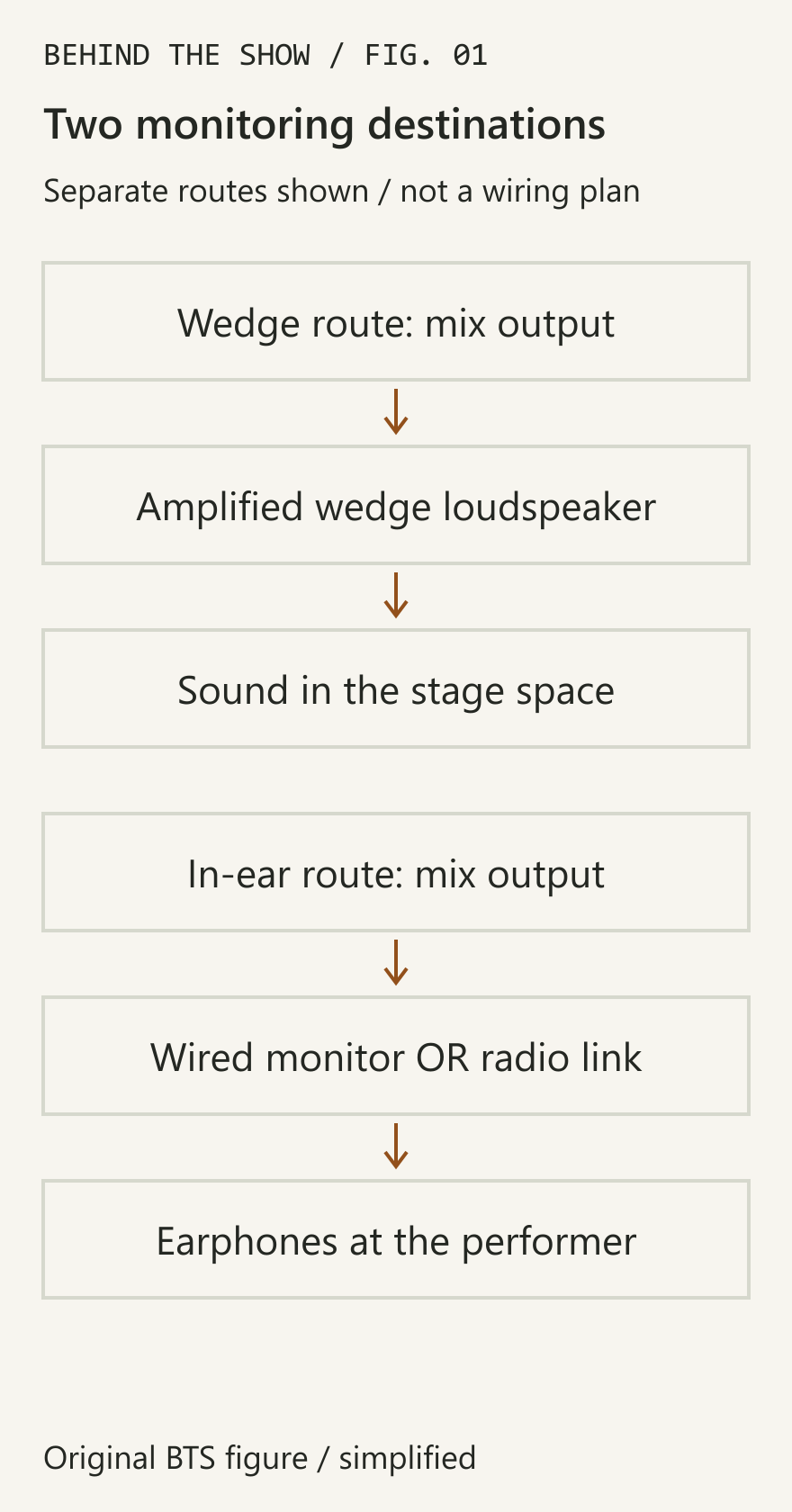
Wired and wireless are separate choices
In-ear monitoring does not always require a radio link. A stationary player may use a wired personal monitor, while another performer needs wireless movement. Confirm the actual requirement rather than treating every in-ear request as an identical package. Personal monitoring introduction
For wireless systems, include the transmitter and receiver inventory in the event's frequency-coordination plan. Wireless microphones and in-ear systems must be considered together; matching preset group numbers across different systems does not establish compatibility. The responsible audio or RF specialist assesses the actual inventory and environment. Wireless coordination
Count mixes separately from listeners
Several listeners may share one agreed mix. Several receivers do not automatically mean several independently controlled mixes. Establish which performers need different content and whether the intended routing is mono or stereo; then have the audio team confirm the required outputs and system capability. PSM300 system and routing example
For the radio-system planning handover, read How to Plan Wireless Microphones for a Live Event.
Record the result in the technical rider advance. Separate equipment availability from agreement that the arrangement satisfies the artist's requirement.
Agree ownership, communication and changes
Use a short handover record:
- Performer and intended position or movement.
- Monitoring method and required mix content.
- Provider of earphones, packs, transmitters, wedges and associated connections, as applicable.
- Person operating the mix and the way changes will be requested.
- Battery, charging, identification and spare arrangements where needed.
- Check time and agreed response if the listening arrangement becomes unavailable.
These are BTS planning fields. An artist bringing a receiver does not by itself confirm a compatible transmitter, available mix output or accepted RF plan. Verify the actual equipment with the audio team.
Worked example: two receivers, one requested change
Illustrative scenario, not a documented BTS event.
Two performers initially agree to share a monitor mix. Later, one asks for a different balance. The coordinator records the changed requirement and asks the audio team to assess how that system can provide it. Adding another receiver without checking routing may leave both performers hearing the same mix.
The decision record should state the accepted arrangement, who provides it and what must be checked again. Link the change to the current rider and soundcheck, rather than leaving it as a verbal equipment request.
Listening level still needs attention
In-ear monitoring is not an automatic guarantee against harmful listening levels. Shure explicitly cautions that excessive personal-monitor volume can remove its hearing-preservation benefit. Have the responsible team address fit, use and level management for the actual arrangement. This comparison does not prescribe a safe volume setting or individual hearing advice. Personal monitoring introduction
Key takeaway
Choose a monitoring arrangement by agreeing the listening need, complete signal path, equipment ownership and operating method. Then test it with the performer. Changing the listening destination does not remove the need for production coordination.
Sources & references
- Introduction to Personal Monitoring SystemsShure / manufacturer / 15 Jul 2007
- 10 Reasons Why In-Ear Monitors Are Better Than WedgesShure / technical reference / 11 Feb 2015
- Shure Whiteboard Session: How to Coordinate a Wireless SystemShure / technical reference / 10 Dec 2015
- PSM300 User GuideShure / technical reference
Continue learning